Planned Replacements Report
If you use the Planned Replacements feature, all planned replacements can be viewed and managed in the Planned Replacements report.
In the criteria, you select only the stores for which you want to display the planned replacements. The table then provides attributes for each record, such as:
- Created Date and Last Change
- QID of the planned replacement
- Name, ID, and other product attributes always of the old and new product
- Block ID, Store ID
- Secondary Placement
Planned Replacements Report
If you have set a Secondary Placement for some products, you will find a separate column for this attribute in the report, which helps you identify which product is primary and which products are secondary.
Planned Replacements - Secondary Placement
The important column is the State column which displays the state of the planned replacement. There are four states: Planned, Done, Invalid, and Canceled.
- Planned - the best replacement for the original product is found, but it does not meet the conditions defined in the Replace in Planogram Condition attribute - it is therefore planned as a future replacement.
- Done - the planned replacement begins to fulfill the Replace in Planogram Condition and becomes a replacement.
- Invalid - the planned replacement is invalidated when the original product can no longer be found.
- Canceled - cancellation of a planned replacement by the user through automatic import of the Canceled value.
Planned Replacements - State column
If you want to manually remove some records from the report, simply mark them in the table and delete them.
Removing records from the Planned Replacements report
Import Basic Entities from CSV
This import allows you to send information to Quant about which replacements should be canceled. We import the value Canceled. If you use your own equivalent value in the CSV file, you also need to set its replacement when mapping.
Import Basic Entities from CSV - Basic Entitiy for Import and Matching Attribute
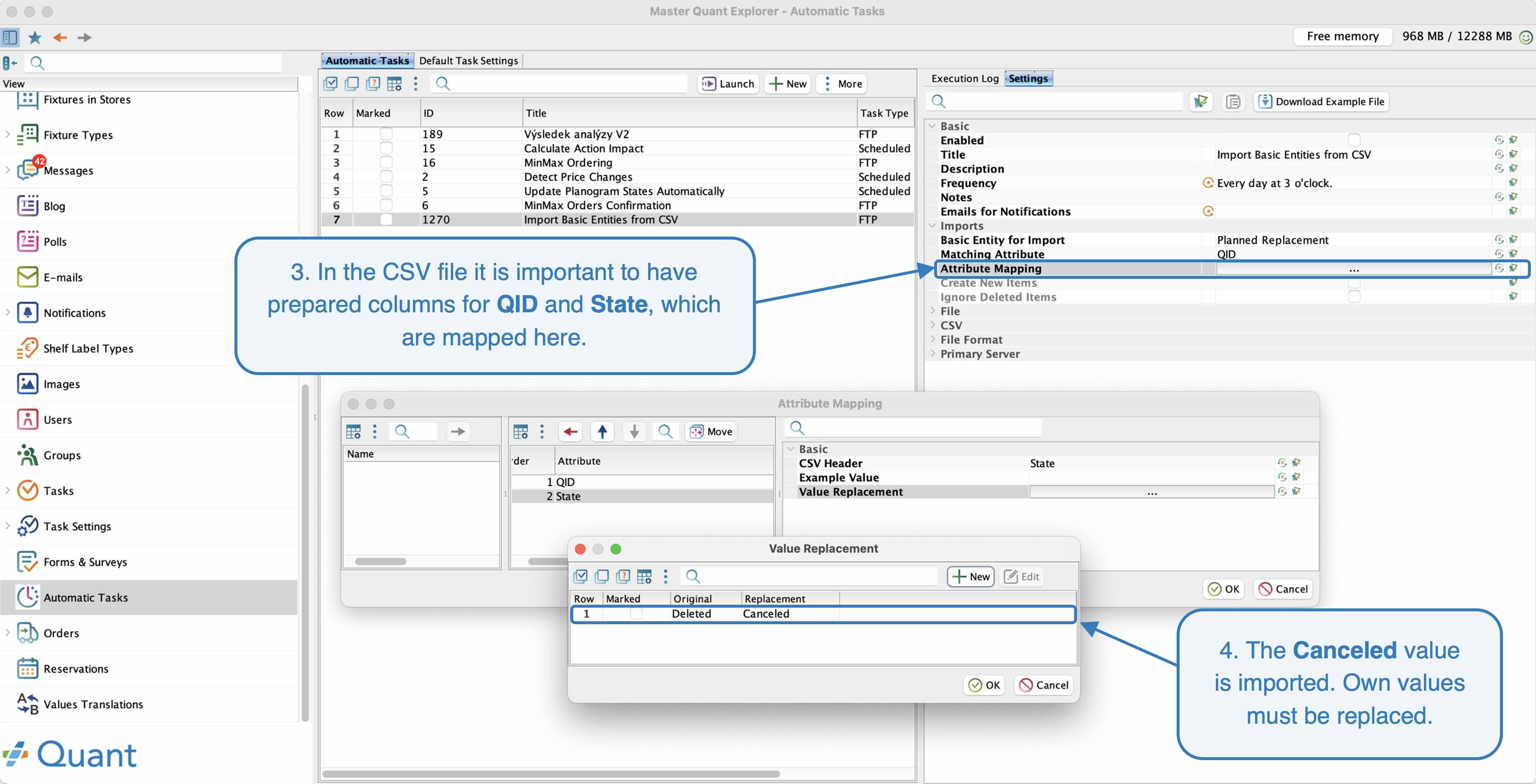 Import Basic Entities from CSV - Attribute Mapping
Export of planned replacements report
The report results can be automatically exported to CSV as part of the automatic task Analysis Report V2.
Analysis Report V2 - Planned Replacements
If you use our automatic orders, planned replacements will be ordered automatically. However, if you use an external ordering system, you can connect the export to it.