New life cycle states related to Task Management
Release date: 01.12.2025
We have added new lifecycle states Disapprove, New Photo Required and Approved. These new states can be closely tied to Task Management. Based on the task setting assigning any of the above-mentioned states will automatically trigger new task creation. This release note covers scenarios for both types of tasks.
Disapprove State - automatic Task creation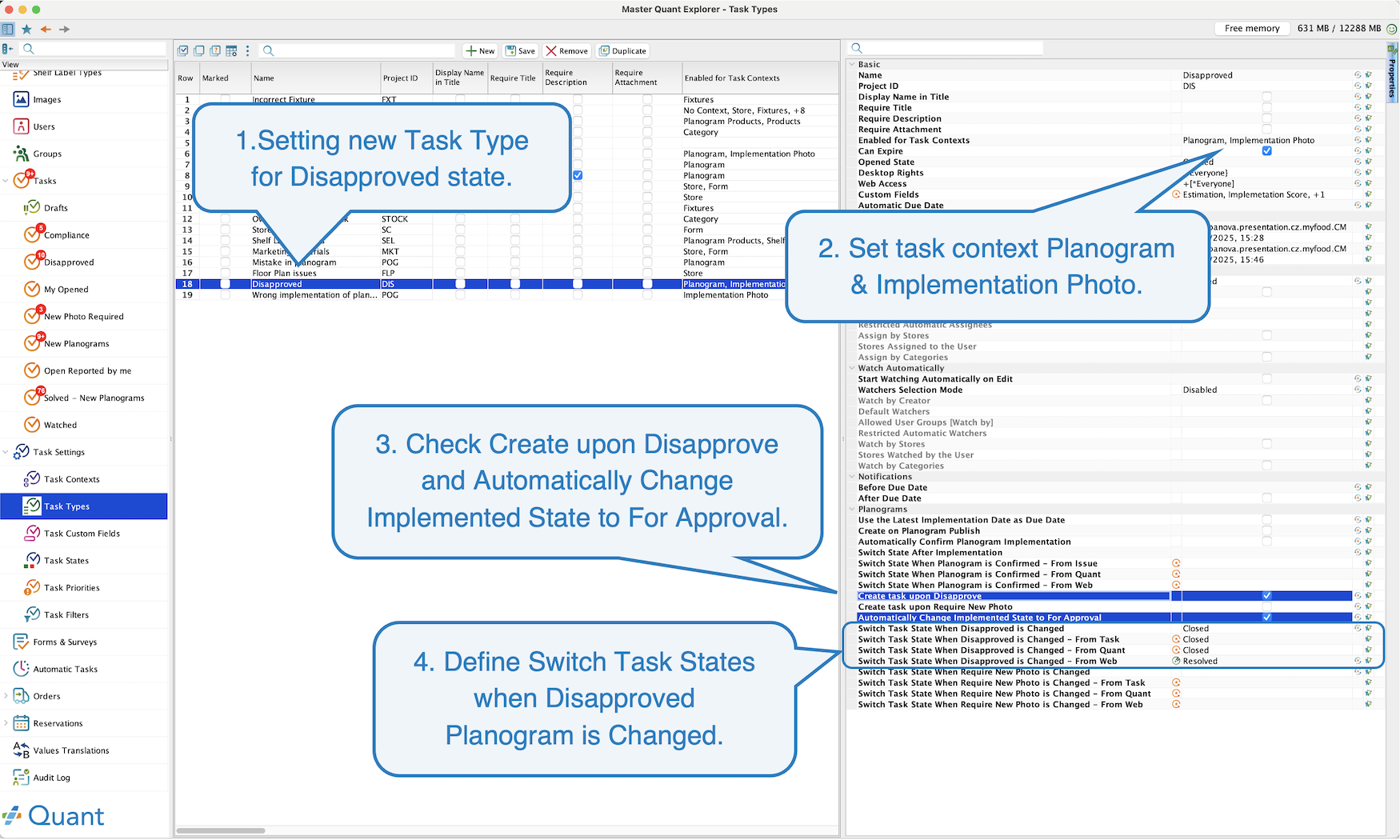 Disapprove task setting
- Create task upon Disapprove – when planogram state changes to Disapproved, task is created.
- Automatically Change Implemented State to For Approval – when task is resolved planogram will change its state from Disapproved to Waiting for Approval
- Switch Task State When Disapproved is Changed - defines what happens to the task when task subject has been resolved outside of the task itself. This can be done directly from Quant, on Web or by any other task.
Category Manager disapproves planogram. Store Manager opens the task and goes directly to planogram. In planogram the Store Manager uploads new implementation photo. This will automatically close the task as Resolved so that store manager doesn’t have to backtrace to task and resolve it manually. See also next example.
Along with Disapprove and New Photo Required state we have added more implementation states, such as Waiting for Approval, to better define the process of planogram approval. To learn more about these states please visit Follow-up statuses after implementation.
These states can be triggered in Published Project/Standalone Planograms reports or in Implementation photos report.
Disapprove in Published Project Planograms
Disapprove in Implementation Photos
The process of Disapproval is same for all mentioned reports, therefore for simplicity’s sake the process will be shown via Implementation Photos report, avoiding unnecessary repetition.
Disapprove message
Task creation
Implementation photo upload
Task resolution and implementation state switch
Implementation photo is uploaded directly into the planogram instead of the task.
Implementation photo uploaded directly to planogram
We set up Switch Task State When Disapproved is Changed – From Web to Resolved.
Task state change and implementation state change
Implementation photo is disapproved first and subsequently approved, both done directly from Quant.
Require New Photo state - automatic task creation
New Photo Required is a tool developed to allow users request an updated photo for long standing planograms. As these planograms do not change very often, category managers now have a tool to Request New photo and check the display of the said planogram.
- Create task upon Require New Photo – when planogram state changes to Require New Photo, task is created.
- Automatically Change Implemented State to For Approval – when task is resolved planogram will change its state from Require New Photo to Waiting for Approval
- Switch Task State When Require New Photo is Changed - defines what happens to the task when task subject has been resolved outside of the task itself. This can be done directly from Quant, on Web or by any other task.
As before with Disapproved Tasks, New Photo Required can be enabled in Published Project/Standalone Planograms reports or in Implementation photos report.
Require New Photo in Published Project Planograms
Require New Photo in Implementation Photos
Require New Photo message
Task creation
Implementation photo upload
Task resolution and implementation state switch