Min- und Max-Werte
Die Mindest- und Höchstwerte können sich nach der festgelegten Anzahl von Tagen richten, für die der Vorrat in der Filiale ausreichen soll. Zur Berechnung dieser Werte werden Verkaufsdaten effektiv genutzt, was bedeutet, dass sie für jede Filiale spezifisch sind und auf deren Verkaufsleistung basieren; daher müssen sie nicht für jede Filiale einzeln eingerichtet werden. Sie können auch fixierte Werte für Minimum und Maximum einrichten. Gleichzeitig übernimmt jedes Produkt, das im Planogramm platziert wird, automatisch die Werte für Minimum und Maximum aus dem Planogramm. Die daraus resultierenden Werte für Minimum und Maximum werden dann auf der Grundlage der MinMax-Regeln ermittelt.
Alle Minimums und Maximums können nebeneinander bestehen. Es gilt jedoch die Regel, dass Quant immer das größte der verfügbaren Minimums und das kleinste der verfügbaren Maximums berücksichtigt. Die Ausnahme ist, dass die Einstellung von Minimum und Maximum für ein Produkt Vorrang vor der Einstellung dieser Werte für eine Kategorie hat.
Min. und Max. Tagesreserve
Min Tage Reserve gibt die minimale Anzahl von Tagen an, für die der Produktvorrat in der Filiale ausreichend sein muss.
Max Tage Reserve hingegen gibt die maximale Anzahl von Tagen an, für die die Filialen einen Produktbestand vorhalten können. Daher darf der Produktbestand nicht höher sein als die Anzahl der Tage, die im Durchschnitt für die in der Max Tage Reserve eingerichtete Anzahl von Tagen verkauft werden.
Die Mindestreserve ist auf 1 Tag und die Maximalreserve auf 2 Tage eingerichtet. Anhand eines Beispiels soll nun gezeigt werden, wie dieses Produkt bestellt wird. Dieses Beispiel veranschaulicht, wie Quant das Mindest- und Höchstbestellvolumen auf der Grundlage der Mindestreserve, der Maximalreserve und der Prognose berechnet.
Minimum Tage Reserve | Maximum Tage Reserve | Min Wert | Max Wert |
1 Tage | 2 Tage | 8,95 | 7,66 + 9,46 = 17,12 |
Die Tabelle zeigt die berechneten Werte für Min und Max. Der Min-Wert basiert auf der Summe der prognostizierten Umsätze über eine bestimmte Anzahl von Tagen. In diesem Fall muss die Anzahl der Tage der Anzahl der Tage in der Minimum Tage Reserve entsprechen. Für den Max-Wert entspricht die Anzahl der in die Berechnung einbezogenen Tage der Maximum Tage Reserve. Die Auswahl der zu summierenden Tage ist ebenfalls wichtig. Diese Auswahl muss mit dem Liefertermin (für den Maximalwert) und dem nächsten Liefertermin (für den Minimalwert) der Bestellung beginnen.Grafik der Bestellung
Aus der Bestellübersicht geht hervor, dass die Bestellung am 3. Januar erstellt wurde und die Lieferzeit 1 Tag beträgt. Der Liefertermin für diese Bestellung ist der 4. Januar. Der Liefertermin für die nächste Bestellung ist der 6. Januar.
Prognostizierter Umsatz des Produkts aus der Bestellung
Die Filiale muss mindestens 8,95 Einheiten des Produkts auf Lager haben, um einen Vorrat für einen Tag sicherzustellen. Der maximale Lagerbestand sollte 17,12 Einheiten betragen (ein Vorrat für zwei Tage). Sobald der prognostizierte Lagerbestand des Produkts voraussichtlich unter 8,95 Einheiten fallen wird, generiert Quant eine Bestellung für dieses Produkt in einer Menge, die ausreicht, um den Lagerbestand wieder auf 17,12 Einheiten aufzufüllen.
Welche Vorteile hat das Einrichten von Minimal- und Maximalwerten gegenüber Tagesreserven?
- Automatische Bestellungen können sich auf die aktuellsten Umsatzdaten (z. B. für den letzten Monat) stützen.
- Die berechneten Werte sind variabel und können so auf Änderungen im Umsatz reagieren.
- Mit dieser Einstellung können Sie flexibel auf einen Anstieg oder Rückgang des Umsatzes reagieren (wenn z. B. ein plötzlicher Anstieg des Umsatzes eintritt, wird der Wert von Minimum und Maximum automatisch erhöht, ohne dass die Werteinstellungen geändert werden müssen).
- Das Einrichten von Min- und Max-Tagesreserven kann auch in Situationen verwendet werden, in denen Sie z. B. nur einmal pro Woche beim Lieferanten bestellen und sicher sein wollen, dass es zu keinem Ausfall kommt. Wenn Sie die minimale Tagesreserve auf 7 Tage einrichten, wird sichergestellt, dass Ihr Vorrat nie unter ein Niveau fällt, das nicht für 7 Tage ausreichen würde.
- Sie können das Verfallsdatum von Produkten berücksichtigen. Wenn Sie zum Beispiel wissen, dass ein Produkt ein Fach von 10 Tagen hat, dann richten Sie die Maximale Tagesreserve auf maximal 10 Tage ein. Auf diese Weise stellen Sie sicher, dass die Ware in der Filiale nicht verfallen wird.
- Da dabei die Umsätze der einzelnen Filialen berücksichtigt werden, müssen nicht für jede Filiale separat Werte eingerichtet werden.
Sie können Ihre täglichen Reserven an den folgenden Stellen einstellen:
- In der Kategorie für alle Filialen. Ideal ist es, die täglichen Reserven für die gesamte Produktkategorie festzulegen, so dass die Einstellungen für die meisten Produkte innerhalb der Kategorie passen. Wenn Sie später feststellen, dass diese Einstellung für bestimmte Produkte nicht ganz zufriedenstellend ist, können Sie sie nachträglich für das jeweilige Produkt ändern (siehe Punkt 3.).
- Für jede Kategorie und jede Filiale. Wenn Sie für eine Filiale andere Tagesreserven festlegen möchten als für eine Kategorie, z. B. aufgrund unterschiedlicher Bestelltage, wählen Sie die Kategorie Filialeinstellungen.
Tage Reserve in der Kategorie Filialeinstellungen
- Auf dem Produkt für alle Filialen. Sie können die täglichen Reserven direkt für das Produkt festlegen. Diese Einstellung hat Vorrang vor der Einstellung pro Kategorie.
- Für ein Produkt mit spezifischen Werten für verschiedene Filialen - in manchen Fällen müssen Sie für dasselbe Produkt in verschiedenen Filialen unterschiedliche minimale und maximale Tagesreserven einrichten.
- Auf der Ebene des Lieferanten im Abschnitt Lieferanten – für alle Produkte dieses Lieferanten. Die maximale Reserve in Tagen kann auf Produkt-, Kategorie- oder Lieferantenebene eingerichtet werden. Wenn der Wert direkt auf dem Produkt eingerichtet wird, hat er immer Vorrang und wird unabhängig von anderen Ebenen verwendet. Für Kategorien gilt jedoch die MinMax-Regel. Wenn also kein Wert auf der Produktebene angegeben ist, wird der niedrigere Wert zwischen der für die Kategorie und den Lieferanten eingerichteten maximalen Reservetagezahl für das Maximum der Bestellung verwendet.
- Im Abschnitt Lieferanteneinstellungen für einzelne Filialen – beispielsweise wenn Sie für denselben Lieferanten in verschiedenen Filialen unterschiedliche Mindest- und Höchstwerte für die Tagesreserven einrichten möchten.
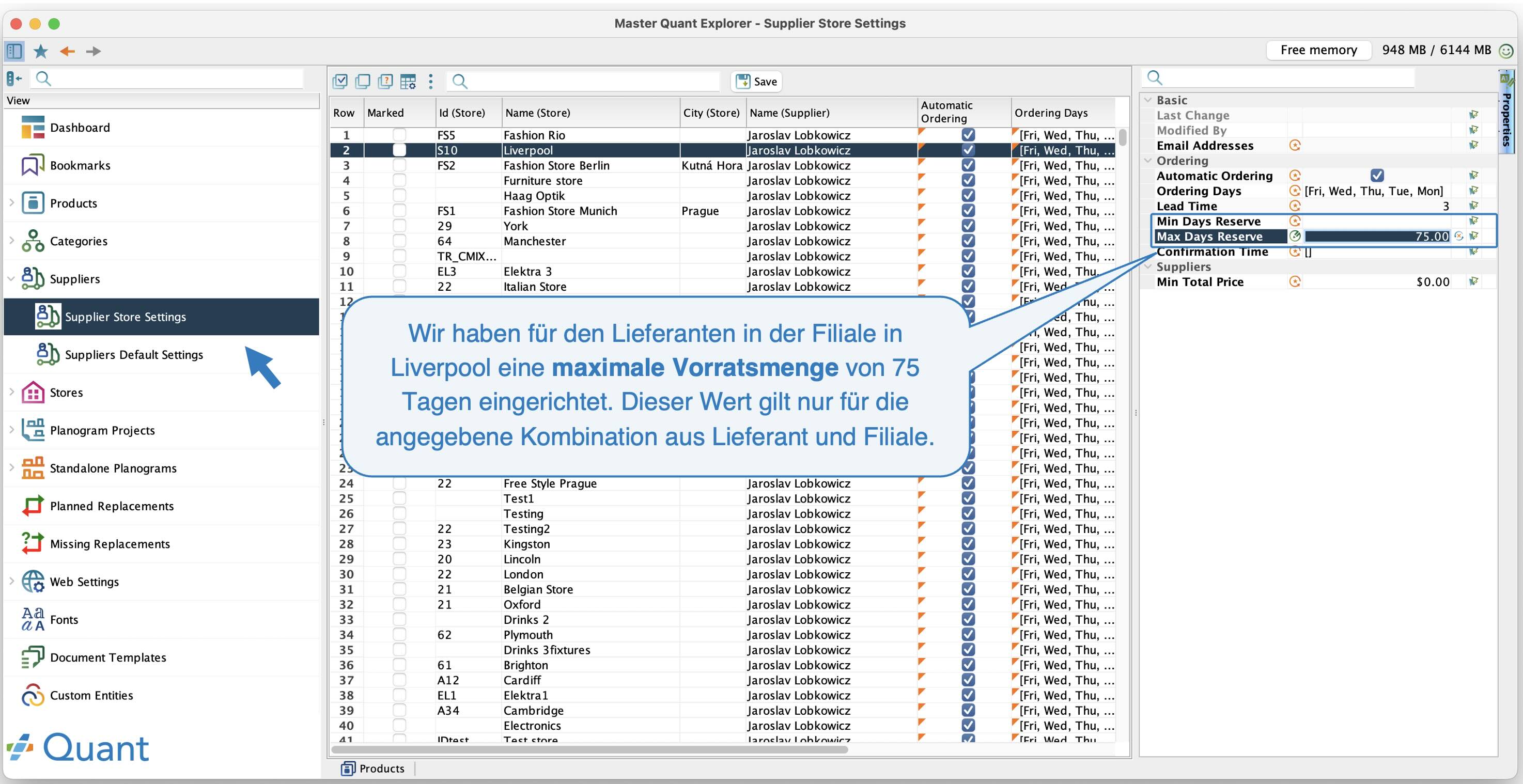 Tagesreserve für Lieferanten in einer bestimmten Filiale
Min. und Max. Volumen
Min- und Max-Volumen ist ein fixierter Wert, der nicht mehr neu berechnet wird.
Wenn Sie das Min-Volumen auf 10 Stück und das Max-Volumen auf 40 Stück einrichten, bedeutet dies, dass, sobald der Produktbestand unter 10 Stück fällt, eine solche Menge bestellt wird, dass der Produktbestand wieder auf 40 Stück aufgefüllt wird.
Diese fixierten Werte von Min- und Max-Volumen bleiben gleich und ändern sich nicht in Abhängigkeit von der Marktgängigkeit der Produkte, d. h., wenn der Umsatz steigt, steigt er nicht automatisch und wenn er sinkt, sinkt er nicht wie bei der Tagesreserve.
Min- und Max-Volumina können in Fällen verwendet werden, in denen Sie Produkte haben, die nicht in den Planogrammen platziert sind, und gleichzeitig handelt es sich um neue Produkte im Sortiment, die keine historischen Umsätze haben.
Sie können die Min- und Max-Volumen pro Kategorie oder für ein bestimmtes Produkt auf die gleiche Weise festlegen wie die MIN- und MAX-Tagesreserve.
Minimal- und Maximalvolumen aus einem Planogramm
Für jedes im Planogramm platzierte Produkt können die Mindest- und Höchstmengen aus dem Planogramm abgerufen werden. Diese Werte liefern wertvolle Informationen zu Platzbeschränkungen für den Bestellprozess. Dank der Verknüpfung automatischer Bestellungen mit Planogrammen kann es nicht vorkommen, dass die Filiale Waren bestellt, für die keine Fläche in der Filiale vorhanden ist, um sie anzuzeigen.
Mindest- und Höchstmengen werden automatisch für jedes im Planogramm platzierte Produkt berechnet, sofern Sie dies unter Bestelltypen aktivieren. Dadurch verfügt jedes im Planogramm platzierte Produkt über eine Mindest- und Höchstmenge, auch wenn Sie keine einrichten. Dies verhindert, dass es aus der Bestellung ausgelassen wird, obwohl es im Planogramm angezeigt werden soll.
Weitere Informationen hierzu finden Sie im Handbuch zu den Bestelltypen nachlesen.
Das Minimum im Planogramm bezeichnet die eingerichtete Mindestanzahl an Verpackungen für einen Block. Das Maximum ist die Anzahl der im Planogramm platzierten Produkte bzw. dessen maximale Kapazität, wobei die maximale Anzahl an Produkten berücksichtigt wird, die aufgrund der Abmessungen in die Ausstattung passen.
Analyse Min Max Übersicht
In Quant ist die Analyse im Menü Analyse / Min Max Übersicht verfügbar. Wir empfehlen, diese Analyse zu überwachen, um herauszufinden, welche Minima und Maxima für das ausgewählte Produkt in der Filiale eingerichtet sind. Sie können hier z. B. sehen, welches Minimum und Maximum aus dem Planogramm stammt, welches Minimum und Maximum auf dem Produkt eingerichtet ist und welches Minimum und Maximum aus den täglichen Reserveeinstellungen berechnet wird. Sie sehen immer das sich ergebende Minimum und Maximum, die bei der Generierung von Bestellungen berücksichtigt werden. So können Sie leicht herausfinden, warum z. B. das Produkt nicht in die Bestellung gekommen ist.
Ein weiterer nützlicher Bericht ist der Filial Lagerbestand, der den Bestand eines bestimmten Produkts in einer ausgewählten Filiale anzeigt. Weitere Informationen zu dieser Analyse finden Sie im Handbuch unter Analysen Überblick.
In Quant können Sie zudem verfolgen, wie sich Margen, Umsätze oder andere Umsatzkennzahlen über einen bestimmten Zeitraum entwickeln. Die Entwicklung dieser Kennzahlen lässt sich für einzelne Produkte, ganze Kategorien oder bestimmte Produktgruppen verfolgen. Diese Analyse kann auch zur Anzeige von Prognosen genutzt werden. Weitere Informationen finden Sie im Handbuch Entwicklungsanalysen.